Shows what happened
Speed, RPM, G-force and lap traces make the numbers obvious.
Windows desktop software for karting and club motorsport
The missing link between Race Studio 3 and your video footage
Synchronise Race Studio 3 telemetry with onboard video captured from your existing camera so you can review laps with telemetry data in context, without relying on an expensive dedicated camera ecosystem.
Try it with your own footage first. Buy later and activate the same installed copy.
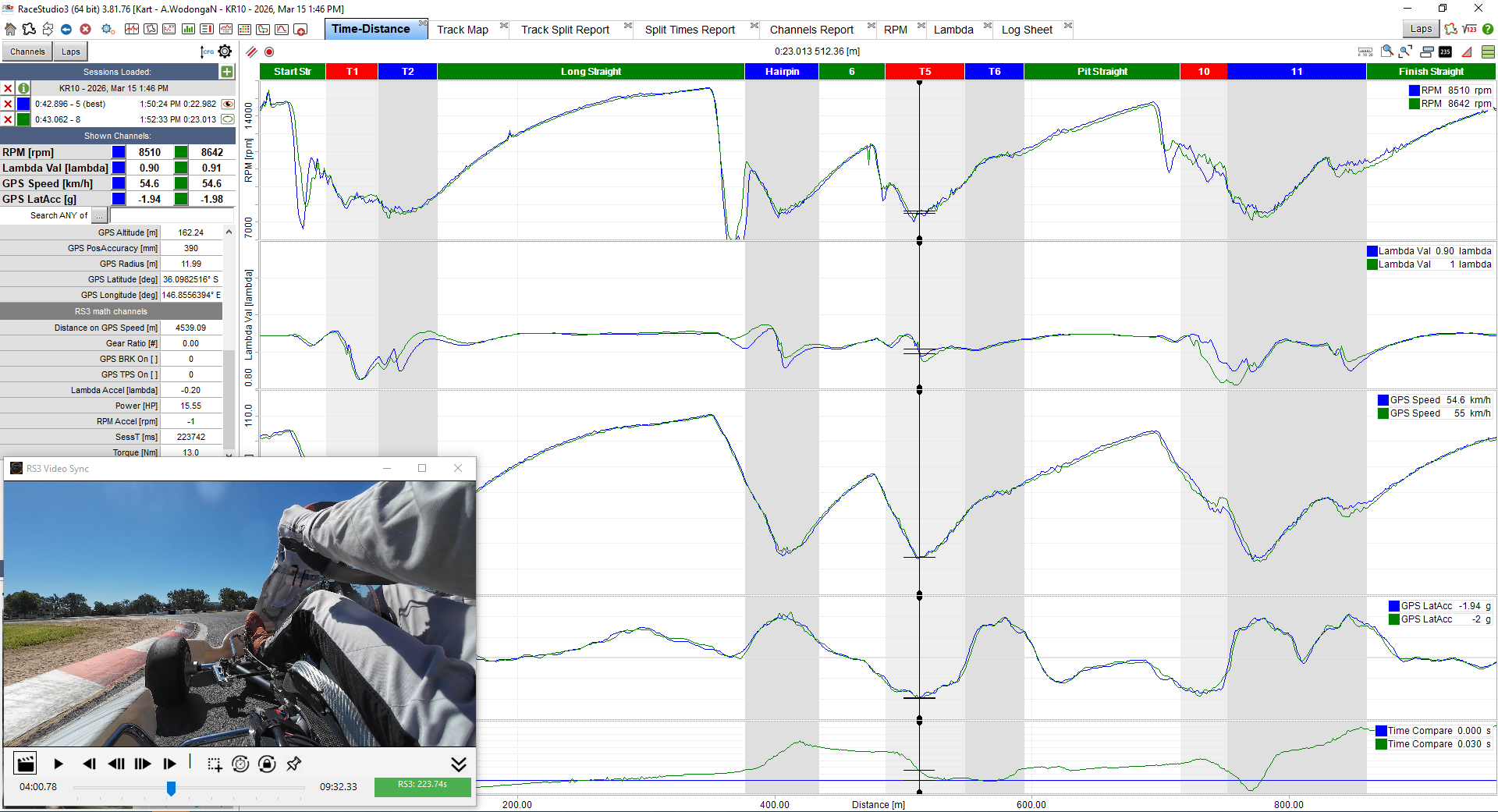
Actual RS3 Sync screen beside Race Studio 3. Click to enlarge.
Why RS3 Sync exists
Telemetry data and onboard video are powerful analysis tools on their own. Combined together, they become far more valuable.
RS3 Sync links Race Studio 3 telemetry with your video so you can see exactly what the driver and the data were doing at the same moment.
Speed, RPM, G-force and lap traces make the numbers obvious.
Line choice, steering inputs, curb use and driver behaviour become clear.
Review the lap with the data and the footage aligned, instead of mentally matching them yourself.
See RS3 Sync in action
RS3 Sync running alongside Race Studio 3. Click the screenshot to view it full size.
Who it's for
RS3 Sync is aimed at racers and coaches who want better lap analysis without adding an expensive camera ecosystem.
Analyse your laps with both telemetry and video context so setup changes and driving changes are easier to understand.
Review braking points, throttle application and line choice alongside your data without changing your existing workflow.
Show drivers exactly what the data means by linking telemetry with real onboard footage at the same point in the lap.
How it works
Load the Race Studio 3 session you want to review and move to a useful reference point.
Open the matching onboard video file in RS3 Sync and scrub to the same moment.
Align the video with the RS3 cursor once and save the offset for smooth replay.
Play back and compare the footage with the data in context instead of switching between separate tools.
Pricing
Download the trial and confirm it works with your setup, your footage and Race Studio 3 workflow. When you are ready, activate instantly with a one-time licence.
One-time purchase — no subscription
Introductory pricing available for a limited time. Instant access after checkout.
Download the trial
Install the trial, open one of your RS3 sessions, and confirm the workflow suits your setup before buying a licence.
FAQ
No. RS3 Sync is intended to work with the onboard video you already record.
Yes. The product is designed around a trial-first workflow so you can test it with your own footage before purchasing a licence.
Yes. Buy a licence on the website, receive a key, then activate the copy you already installed.
Yes. The same help page can be bundled with the app for offline use, so key setup and workflow guidance is still available away from internet access.
Kart racers, club racers and driving coaches who already use Race Studio 3 and want a practical way to review video and telemetry together.